
Chat
Normal chat
Section titled “Normal chat”A message you write in the chat goes to the players near you. Close to you, your message arrives in the clear. Beyond a certain distance, it arrives more and more garbled, and a player who is too far gets nothing.
Clan chat
Section titled “Clan chat”To write to your clan, type /clan chat followed by the message, or start your message with !.
Only the members of your clan see this message.
You can send it from a SafeZone, from a turf of your clan or from the turf of a clan that has declared your clan an ally. Anywhere else, the game refuses the message. A member who is outside these zones does not get the text: they only see that a message could not reach them.
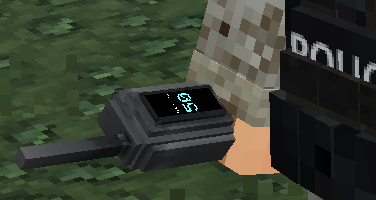
The radio works in your hand or in its gear slot. It gets a random channel the first time you hold it or equip it. As long as you hold the radio, its channel shows above your hotbar.
- Standing, your message goes out on your channel across the whole map, and nearby players hear it too.
- While you sneak, your message only goes out on your channel.
- Players whose radio, in hand or equipped, is tuned to the same channel get your messages.
- When you talk on the radio, nearby players hear its beep, even if you sneak.
To change channel, use the radio in your hand: the channel goes up by one step, or down by one step if you sneak.
When you hold the radio in your hand, you can also type /radio followed by the channel.
Megaphone
Section titled “Megaphone”Keep the megaphone in your hand and write your message. All online players get the message in the chat and in a notification, and a sound comes with it. The megaphone is gone after this message.